

Your ACoS looks fine. Your margin says otherwise.
That gap is where most Amazon ads performance problems hide, behind numbers that are accurate but incomplete. Spend rises, sales stall, and the dashboard stays calm.
Reading Amazon ads performance well means knowing which metrics tell the truth, how often to check them, and when to act.
Did You Know? Amazon's advertising business generated over $68 billion in revenue in 2025, continuing its rapid growth and making it one of the most contested digital advertising platforms on the internet. More sellers competing for the same impressions means less room for a monitoring gap.
In 2026, running Amazon ads means managing multiple campaign types at once, reading data that lags by days, and keeping pace with an algorithm that keeps shifting how shoppers find products.
A number on a screen means very little without the right process around it. Platforms like Xneeti are built for exactly this problem, running continuous, structured monitoring across every ad format so nothing slips through. This guide covers the complete monitoring system: what to track, how often to check it, and what to do when something looks off.
Step-by-step workflow to Monitor Amazon Ads Performance
Monitoring Amazon ads performance is not about checking random metrics in isolation. It is a structured sequence that helps you understand where a problem is before deciding what to do about it. When followed consistently, this workflow removes guesswork from how to monitor Amazon ads and turns raw data into clear actions. This becomes significantly easier when you are working with a structured Amazon ads dashboard setup.
Step 1: Start with Portfolio-Level Health (TACoS)
Begin with TACoS to understand whether your overall ad spend is aligned with total revenue or quietly increasing your dependency on paid traffic. This top-level view tells you if the issue is account-wide or limited to specific campaigns.
Step 2: Break Down by Campaign Type
Once you know the direction at the portfolio level, review performance across Sponsored Products, Sponsored Brands, Sponsored Display, and DSP. Differences between formats often reveal where Amazon ads performance tracking needs deeper attention.
Step 3: Diagnose Using Core Metrics
Focus on CTR, CVR, CPC, and ACoS to identify what is actually causing the shift in performance. Each metric points to a specific problem area, letting you monitor Amazon ads performance with clarity rather than assumptions.
Step 4: Apply the Correct Look-Back Window
Avoid using the last 1–3 days of data, attribution lag makes it incomplete and misleading. Reliable Amazon advertising performance monitoring depends on using validated data windows that reflect actual performance.
Step 5: Take Action Based on Thresholds
Once the issue is clear, act using predefined thresholds rather than reacting to short-term fluctuations. Pause keywords with high spend and zero conversions. Raise bids on terms consistently hitting your ACoS target. Add non-converting search queries as negatives. This is where how to track Amazon ads performance turns into consistent, repeatable decision-making.
Why Is Unstructured Monitoring Costing Amazon Sellers More Than They Realize?
Most sellers are not ignoring their ads. They are just checking them the wrong way. They log in when something feels off, glance at a number or two, and move on, assuming things are fine. That assumption is where the money goes.
By the time an ACoS report looks alarming, the problem has usually been running for five to seven days already. The spend was happening. The signals were there. Nobody caught them in time.
The False Confidence Trap
A seller opens the dashboard, sees a ROAS number that looks acceptable, and closes the tab. That one number does not show which campaign is dragging performance, which keyword has been bleeding budget all week, or whether organic sales are quietly covering for a paid strategy that stopped working. It just looks fine until it does not.
- Which campaign type is pulling performance down
- Which keyword is quietly draining the budget
- Whether organic sales are masking paid inefficiency
The Multi-Format Blind Spot
Spending more every month while results stay flat is one of the most frustrating positions an Amazon seller can be in, especially when the dashboard shows no obvious cause. In 2026, most accounts run Sponsored Products, Sponsored Brands, Sponsored Display, and DSP at the same time. Reading one metric from one campaign type does not tell you what is happening across the account. Real Amazon PPC performance monitoring means looking at everything together, not in pieces.
The Timing Problem
ACoS spikes rarely come out of nowhere. Behind every sudden number shift, there is usually a keyword that crossed a spend threshold, a placement that stopped converting, or a budget that exhausted itself before peak hours. These are not surprises, they are patterns that a structured monitoring cadence catches early. Without one, sellers are always reacting to problems instead of preventing them.
Amazon's campaign reporting framework tracks performance across impressions, clicks, sales, and attribution, giving every advertiser the foundation to build a structured review process.
What Are the Essential Amazon Ad Metrics to Track?
Not every metric in your dashboard deserves equal attention. Some drive decisions. Some explain why those decisions are needed. And some look useful while quietly pulling focus away from what actually matters.
Before going into the detail, here is a quick-reference table of every metric worth tracking, what it measures and when it belongs in your review:
Metric | What It Measures | When to Use It |
ACoS | Ad spend as a percentage of ad-attributed revenue | Efficiency of individual campaigns and keywords |
TACoS | Ad spend as a percentage of total business revenue | Overall paid dependency and business health |
CTR | Percentage of impressions that become clicks | Ad relevance and creative performance |
CVR | Percentage of clicks that convert to sales | Listing strength and traffic quality |
CPC | Cost per click | Budget efficiency and auction competitiveness |
NTB Order Rate | Percentage of orders from new-to-brand customers | Whether ads are driving growth or re-converting existing buyers |
Impression Share | Your share of available impressions in the category | Competitive visibility and auction pressure |
Placement CVR | Conversion rate by ad placement type | Where budget is working and where it is wasted |
This confusion often comes from not fully understanding how different ad types behave, especially across Amazon sponsored ads campaigns.
The Metrics That Drive Decisions
These five metrics form the core of every performance review. Each one tells you whether to act, not just how things look.
The Signals Behind the Numbers
These are the metrics most sellers never reach. They do not replace the core five, they explain them. When a primary metric moves in the wrong direction, these tell you why.
- New-to-Brand (NTB) Order Rate: Tells you whether your ads are acquiring new customers or repeatedly converting people who would have bought anyway. A consistently low NTB rate means your ad budget is doing retention work, not growth work. Amazon tracks this natively as part of its new-to-brand metrics for Sponsored Brands.
- Impression Share: Tells you how visible your campaigns are relative to total available impressions in your category. A dropping impression share with a stable budget usually means competitors are bidding more aggressively and your ads are losing ground without your ACoS showing it yet. Amazon explains how impression share feeds into product-level advertising visibility directly inside the console.
- CPC Trend: A rising CPC week-over-week is not a problem on its own. It becomes one when CVR stays flat. That combination means you are paying more for the same result, and the margin is shrinking quietly.
- Placement CVR: Performance at Top of Search, Rest of Search, and Product Pages is rarely uniform. Monitoring CVR by placement tells you exactly where your budget is working and where placement modifiers need adjusting.
What to Stop Tracking Obsessively
These metrics are not useless, they just do not belong in your core monitoring routine.
- Impressions in isolation: High impressions with low CTR is a relevance problem, not a win. Volume without conversion context tells you nothing actionable.
- Total clicks without CVR: Clicks tell you traffic arrived. CVR tells you what happened next. One without the other is half a sentence.
- Raw spend numbers: Spend going up is not inherently bad. Spend rising while TACoS climbs and CVR drops is the actual signal worth watching.
TACoS vs. ACoS: Why the Profitability Standard Shifted in 2025–26
ACoS tells you how efficiently your ads are converting paid clicks into sales. That is a useful number, but it only measures half the picture. TACoS (Total Advertising Cost of Sale) measures ad spend against total revenue, including organic sales. That distinction matters more than most sellers realise, because an account can show a healthy ACoS while the broader business is quietly becoming more dependent on paid traffic to survive.
For accurate Amazon ads performance tracking, TACoS is now the primary profitability lens.
The Formula
TACoS = Total Ad Spend ÷ Total Revenue × 100
The inputs are straightforward. Total ad spend comes from your advertising console. Total revenue includes both ad-attributed and organic sales from Seller Central. The number you get is a truer read of how much your entire business relies on paid advertising to generate revenue.
The Relationship Most Sellers Miss
ACoS and TACoS need to be read together, not separately. The combination that should immediately raise a flag:
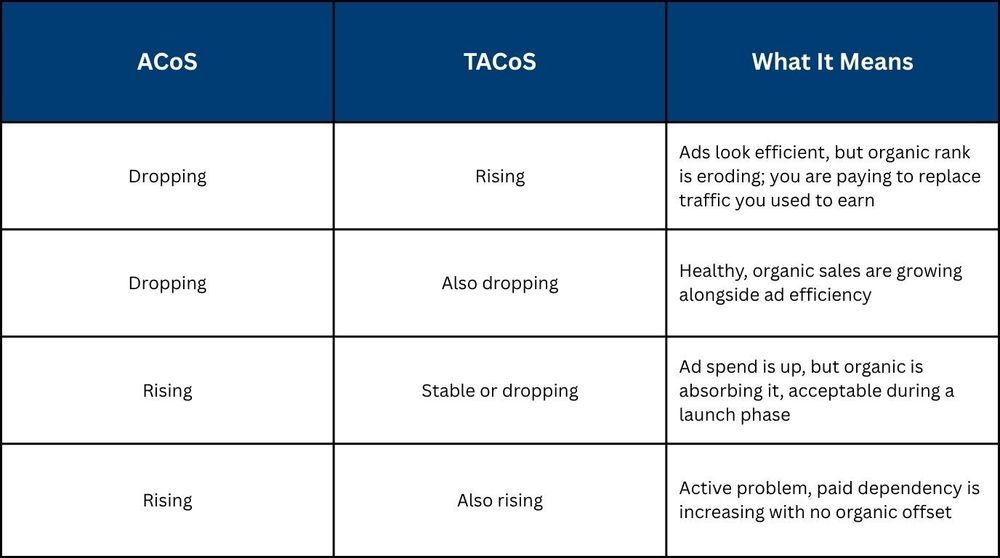
When to Use Which Metric
TACoS is not the right lens in every situation. For a new product launch, TACoS will naturally run high, organic sales have not been built yet, so almost all revenue is ad-attributed. Judging a launch-phase ASIN against a mature TACoS benchmark will produce the wrong conclusions.
- New launches (0–90 days): Track ACoS as the primary metric. TACoS context is useful but not yet meaningful.
- Mature ASINs: TACoS becomes the primary profitability signal. ACoS alone no longer tells the full story.
- Scaling decisions: Always use TACoS at the portfolio level before increasing budget across formats.
Amazon's multi-touch attribution reporting gives advertisers a clearer view of how paid and organic performance interact across the full customer journey, the foundation for reading TACoS accurately.
What Is the 14-Day Attribution Lag and How Does It Affect Your Decisions?
Amazon attributes a sale to an ad click for up to 14 days after that click happens. That means the last 1–3 days of data in your dashboard are always incomplete. Making bid changes or pausing keywords based on that window is not how to track Amazon ads performance accurately, it is reacting to a partial picture.
Attribution Windows by Campaign Type
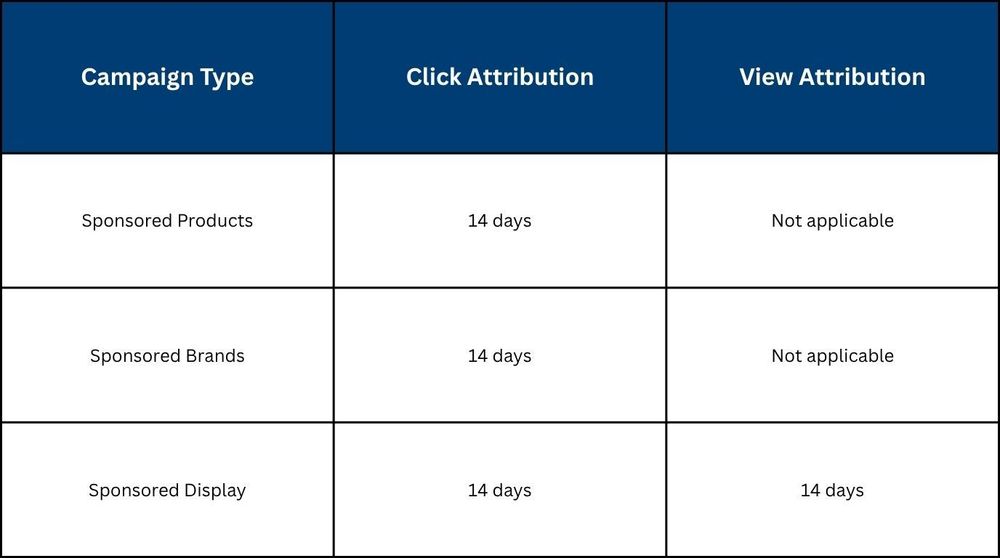
Sponsored Display is the only format where a view, without a click, can still generate an attributed sale. This makes SD performance appear stronger in short windows than it sometimes is.
Minimum Look-Back Windows by Decision Type
- Bid adjustments: 7 days minimum
- Keyword pauses: 14 days minimum
- Scaling or new campaign launches: 21–30 days
Anything shorter risks acting on data that has not finished reporting.
The Over-Reaction Trap
A seller sees ACoS spike over three days, cuts bids immediately, and watches impressions collapse. A week later, fully attributed data shows ACoS was never actually the problem. The bid cut created the real damage.
Amazon's Ads Agent now sends proactive alerts inside the console for spend anomalies and CTR drops. Treat these as early signals, not final verdicts. Always check the look-back window before acting. Amazon's sponsored ads reporting guide explains how attribution windows work across campaign types, essential reading for anyone building a monitoring framework.
Step-by-Step Workflow to Monitor Amazon Ads Performance
Monitoring Amazon ads performance is not about checking random metrics in isolation. It is a structured sequence that helps you understand where the problem is before deciding what to do next. When followed consistently, this workflow removes guesswork from how to monitor Amazon ads and turns raw data into clear actions. This becomes significantly easier when you are working with a structured Amazon ads dashboard setup.
Step 1: Start with Portfolio-Level Health (TACoS)
Begin with TACoS to understand whether your overall ad spend is aligned with total revenue or quietly increasing your dependency on paid traffic. This top-level view tells you if the issue is account-wide or limited to specific campaigns.
Step 2: Break Down by Campaign Type
Once you know the direction at the portfolio level, review performance across Sponsored Products, Sponsored Brands, Sponsored Display, and DSP. Differences between formats often reveal where Amazon ads performance tracking needs deeper attention.
Step 3: Diagnose Using Core Metrics
Focus on CTR, CVR, CPC, and ACoS to identify what is actually causing the shift in performance. Each metric points to a specific problem area, allowing you to monitor Amazon ads performance with clarity instead of assumptions.
Step 4: Apply the Correct Look-Back Window
Avoid using the last 1–3 days of data, as attribution lag makes it incomplete and misleading. Reliable Amazon advertising performance monitoring depends on using validated data windows that reflect actual performance.
Step 5: Take Action Based on Thresholds
Once the issue is clear, act using predefined thresholds instead of reacting emotionally to short-term fluctuations. This step is where how to track Amazon ads performance turns into consistent, repeatable decision-making.
What Does a Real Amazon Ads Monitoring Framework Look Like: Daily, Weekly, Monthly?
An effective Amazon ads performance review runs on three distinct cadences. Each one has a specific purpose, a time budget, and a defined set of metrics. Most sellers either check everything daily, which creates noise, or review monthly, which means problems compound unchecked. Conflating the three cadences means none of them gets done properly.
The 5-Minute Daily Check
This is not an optimization session. It is a quick scan for anything that looks out of place.
- Budget pacing: Is any campaign hitting its daily cap before peak shopping hours?
- Spend deviation: Is today's spend more than 20% above or below your 7-day average?
- Impression drop: Has a previously stable top campaign suddenly lost visibility?
The 30-Minute Weekly Review
This is where the real work happens. Four things to cover every week:
- Search Term Report: Find converting terms to harvest into exact match, while ensuring they align with how your product is indexed through Amazon listing keyword optimisation. Find non-converting terms, burning spend and add them as negatives.
- Placement CVR: Compare Top of Search, Rest of Search, and Product Pages. A strong overall CVR can hide a placement that is quietly draining budget.
- CPC Trend: Rising CPC with flat CVR means you are paying more for the same result. Time to tighten match types.
- Portfolio TACoS: Pull on a 7-day minimum window and track the direction, not just the number.
The 2-Hour Monthly Deep-Dive
The monthly review is about account-level strategy, not individual keywords.
- ASIN-level TACoS: Identify which products are growing organically and which are fully dependent on paid spend. These two groups need different strategies.
- NTB Order Rate: Check whether ads are bringing in new customers or re-converting existing ones. A consistently low NTB rate means growth is slower than revenue suggests.
- Budget reallocation: Move spend across campaign types based on 30-day CVR data, not habit or assumption.
- Seasonal planning: Review whether bids, budgets, and creatives are ready for the next demand cycle. Amazon's peak windows move fast and reward sellers who prepare early.
Amazon's advertising measurement and analytics hub outlines the native reporting tools available for building each of these review layers.
This three-cadence structure is the backbone of serious Amazon ads performance reporting in 2026 and the difference between managing an account and just watching it.
How Do You Set Performance Thresholds That Trigger Action, Not Panic?
The goal of thresholds is simple, they remove guesswork from daily monitoring. Instead of asking "is this number bad enough to act on," a threshold gives you a predetermined answer. When the metric crosses the line, the response is already decided. This becomes far easier when you understand how cost structures like CPC and budgets behave in Amazon ads cost and CPC benchmarks.
Without thresholds, every fluctuation becomes a judgment call. That is where reactive decisions and unnecessary bid cuts come from.
Here is a working threshold framework for Amazon PPC performance monitoring across the five signals that matter most:
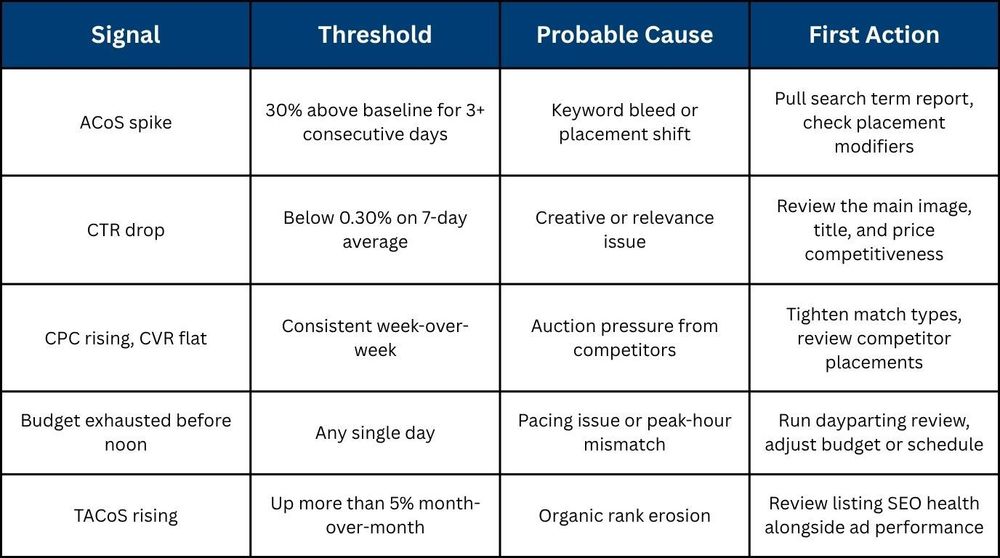
Can You Build an Amazon Ads Alert System Without Third-Party Software?
Yes, a functional alert system can be built directly inside Amazon's native tools without any third-party software. It will not catch everything, but it covers the surface-level signals that most sellers currently miss entirely.
Automated Rules in Campaign Manager
Amazon's Campaign Manager lets you set rule-based triggers that fire when a metric crosses a defined threshold. You can automate:
- Bid reductions when ACoS exceeds a set percentage over a defined window.
- Budget increases when a campaign is pacing to exhaust spend before the end of the day.
- Pause rules for keywords that have accumulated spend beyond a set limit with zero conversions.
Scheduled Reports
Schedule reports to arrive in your inbox automatically instead of relying on manual pulls. Two worth setting on a weekly cadence:
- Search Term Report: Surfaces converting and non-converting queries without logging in.
- Campaign Performance Report: Delivers spend, sales, and ACoS overview across all active campaigns.
This removes one of the most common monitoring failures, reports that never get pulled because the process depends on someone remembering to do it.
The Honest Ceiling
Native alerts catch isolated, surface-level issues well. What they do not catch:
- TACoS drifts across multiple campaign formats.
- NTB order rate erosion over time.
- Placement-level CVR patterns across SP, SB, and SD together.
For serious how to monitor Amazon ads needs and deeper Amazon ads performance tracking, a connected data layer across all formats is what closes that gap.
Why Does Monitoring Each Ad Format in Isolation Give You a False Picture?
Sponsored Products, Sponsored Brands, Sponsored Display, and DSP each attribute sales independently. That means the same sale can be claimed by multiple campaign types simultaneously, and if you are reading each format's performance separately, the numbers will always look better than reality. The only accurate way to track Amazon ad spend performance is at the portfolio level, across all formats together.
The Portfolio TACoS Calculation
Portfolio TACoS is calculated the same way as standard TACoS, but the inputs pull from every campaign type running in the account:
Portfolio TACoS = Total Spend Across All Formats ÷ Total Account Revenue × 100
This number will almost always look less flattering than any individual campaign's ACoS. That is the point. Campaign-level ACoS shows you how efficiently one format is performing on its own terms. Portfolio TACoS shows you what the entire advertising operation is actually costing relative to everything the business earns.:
How AMC Path-to-Purchase Reports Change Cross-Format Monitoring
Campaign Manager only credits the last ad a shopper clicked before converting, everything that influenced them before that moment goes unrecorded. Amazon Marketing Cloud's AMC path-to-purchase reporting, introduced in 2025, maps the full sequence of ad touchpoints before a conversion, giving a far more accurate picture of what is actually driving sales.
Key things this reveals that standard reporting misses:
- Which upper-funnel formats are contributing to conversions that get credited elsewhere?
- Whether cutting SB or SD spend to improve short-term ACoS is quietly reducing SP conversions downstream.
- How budget should actually be distributed across formats based on real conversion paths, not last-click assumptions.
How Does Xneeti Monitor Amazon Ads Performance at Scale?
Most sellers reach a point where the framework in this guide becomes difficult to run manually, especially across 50+ ASINs and multiple campaign types simultaneously, which is where traditional Amazon ads management services often fall short due to delayed reporting cycles. Xneeti's is built specifically for this. It is not a reporting dashboard and not a managed service. It is a natively built AI platform that runs continuous, automated monitor Amazon ads performance operations across every format, every ASIN, every hour, without waiting for a human to open a report.
Real-Time Signals, Not Monthly Slide Decks
- Monitors SP, SB, and SD simultaneously, flagging budget pacing issues, CTR drops, and ACoS deviations as they develop.
- Every AI-flagged signal is reviewed daily by a dedicated account strategist whose sole focus is that account.
- Account-to-strategist ratio is 50% lower than the industry standard, your account gets real attention, not a rotating schedule.
- Problems get caught within 24–48 hours, not discovered in a monthly report after the spend is already gone.
AMC Attribution + AI Anomaly Detection
Xneeti integrates AMC path-to-purchase data so budget decisions are made on actual conversion paths, not last-click assumptions. The AI anomaly detection layer continuously scans for signals that manual review would miss:
- CPC trend shifts before they appear in ACoS
- N-gram bleed patterns inside search term data
- Organic rank erosion before it impacts paid performance
Built by ex-Amazon and ex-Google engineers, how to monitor Amazon ads at scale is not something Xneeti retrofitted into an existing product. It is what OneOS was built to do from day one.
Find Out What Your Amazon Ads Are Missing
Monitoring Amazon ads is not a numbers game, it is a systems game. The sellers who manage profitably in 2026 are not checking their dashboards more frequently. They are checking the right metrics, at the right cadence, with thresholds that remove guesswork entirely from Amazon ads performance tracking.
Xneeti was built to run this system automatically, across every ASIN, every format, every hour of the day. It catches performance problems within 24 hours, not after a week of silent spend waste. If your current setup cannot do that, it is time to monitor Amazon ads performance differently, book a performance audit with Xneeti today.


