

Most Amazon sellers spend days building a keyword list, then lose rankings because they placed those keywords in the wrong fields. Getting keyword research right is only half the equation. The other half is knowing exactly where each term belongs inside your listing. Sellers who master adding keywords to Amazon listings at the field level consistently outrank those who don't, regardless of budget or category.
66% of Amazon users start their online product research directly on Amazon, making keyword visibility on the platform more critical than on any other channel.
Amazon's search environment has shifted considerably over the past two years. The A10 algorithm now rewards conversion signals over keyword density, and Rufus reads listings the way a customer does, not a crawler. For sellers managing this at scale, Xneeti is a multi-marketplace AI platform, built precisely to align Amazon listing keywords with PPC architecture so every keyword works harder across both organic and paid channels. In this article, we cover exactly where to place every keyword type, how Amazon's algorithm processes each field, and which placements deliver the strongest ranking impact in 2026.
Why Keywords Are the Foundation of Both Amazon SEO and Ads Performance
Keywords are not just an SEO checkbox, they are the core signal Amazon uses to decide which products show up, for which searches, and in which order. Without the right Amazon listing keyword strategy, your product simply does not exist for the buyer looking for it right now.
Here is why they carry weight across two fronts simultaneously:
1. Organic ranking
Amazon's algorithm matches a buyer's search query against keywords found across your listing fields. The more accurately and strategically those terms are placed, the higher the relevancy score your listing receives.
2. Paid performance
When a customer enters a word or phrase into Amazon's search field, the search engine uses those words to match with relevant products. When your listing keywords and your ad targeting terms are misaligned, your sponsored ads spend budget on clicks that the listing itself cannot convert, driving up ACoS with little to show for it.
The two are not separate strategies. They are one system. A listing optimized with the right Amazon search terms backend keywords gives your ad campaigns a stronger relevancy foundation, which directly lowers the cost per click needed to stay competitive on high-volume terms.
Did You Know? According to Amazon's own keyword research guide, without proper keyword research, products might not appear in relevant search results, and shoppers could end up purchasing from a competitor instead.
The 6 Places Keywords Live in an Amazon Listing (2026 Field Map)
There are exactly six fields in an Amazon listing where Amazon keyword placement decisions directly impact how your product ranks, gets discovered, or converts. Knowing which field does what and which one is a complete waste of keyword effort is the starting point for any serious Amazon product listing keyword optimization strategy.
Here is the complete 2026 field map:
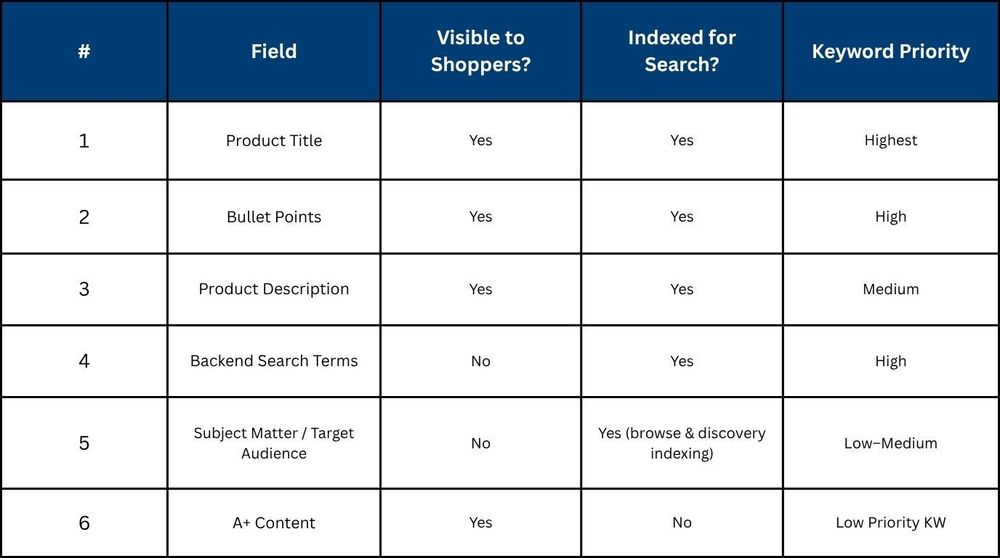
A quick breakdown of each field before the step-by-step section digs deeper:
- Product Title — Your highest-ranking real estate. Primary and high-volume keywords belong here, placed naturally within a readable title structure.
- Bullet Points — Secondary keywords live here, tied to product features and benefits. Rufus reads these closely for natural-language query matching.
- Product Description — Supporting and long-tail terms go here. Less algorithmic weight than the title, but still indexed and still read by buyers.
- Backend Search Terms — Hidden from shoppers, fully indexed by Amazon. The 500-byte field is where synonyms, alternate spellings, and long-tail terms go. More on this in its own dedicated section.
- Subject Matter / Target Audience — Widely ignored by sellers, but these fields now feed directly into Amazon's Browse Node and discovery indexing. Worth filling accurately.
- A+ Content — This is the one field that looks important but contributes zero to keyword indexing.
Many sellers invest hours writing keyword-rich A+ Content modules expecting a ranking boost. Amazon's own platform makes clear that A+ Content is a conversion tool and not a search ranking signal.
Step-by-Step: How to Add Keywords to Each Listing Field in Seller Central
Step 1 — Build Your Master Keyword List Before Touching the Listing
The single most common mistake sellers make is opening Seller Central before their keyword research is done. Sequence matters here, adding keywords without a structured master list leads to gaps, duplication, and missed opportunities across every field.
Before editing a single field, your master list should include:
- Primary keywords: High search volume, directly describe your product.
- Secondary keywords: Mid-volume, feature or use-case specific.
- Long-tail keywords: Lower volume, higher purchase intent, specific queries.
- Synonyms and alternate names: What different buyer segments call the same product.
- Misspellings: Common errors buyers type that still return results.
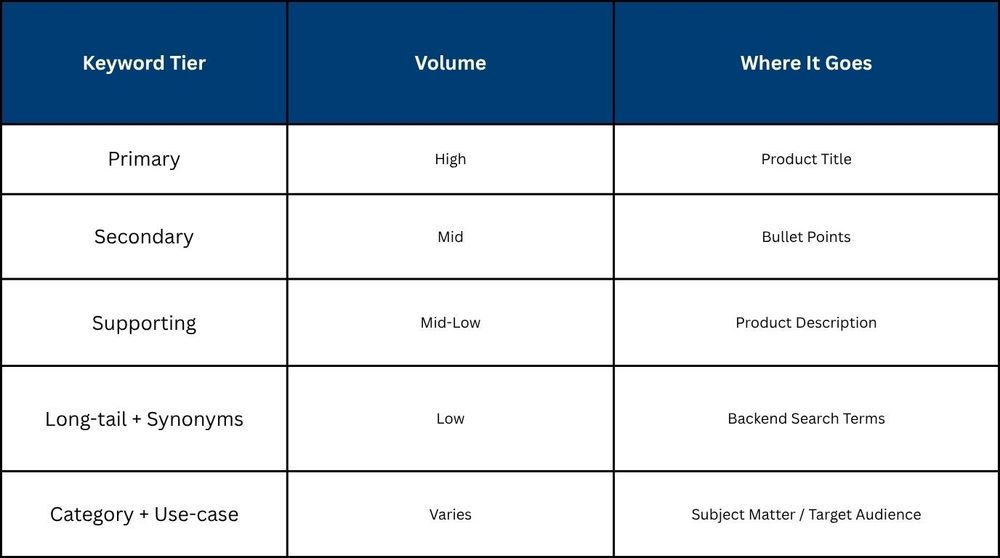
Step 2 — Assign Keywords by Volume Tier to Each Field (Priority Matrix)
Not every keyword belongs in every field. The core rule of Amazon keyword placement in listing is simple: match keyword weight to field weight.
Here is how to assign your master list across fields:
Step 3 — Does Your Title Lead With the Right Keyword?
Your title is the most heavily weighted field in Amazon's ranking system. The primary keyword should appear as close to the beginning as possible, without making the title unreadable.
Follow this structure for a clean, optimized title:
Brand + Primary Keyword + Key Feature + Size/Variant (if applicable)
A few rules that apply directly to how to optimize Amazon listing keywords in the title field:
- No promotional language ("best," "top-rated," "free shipping").
- No special characters — !, $, ?, _, {, }, ^ are not permitted.
- Capitalise the first letter of each word, except prepositions and conjunctions
- Use numerals instead of written numbers.
Step 4 — Craft Bullet Points That Satisfy Both A10 and Rufus
Bullet points are the second most important frontend field for keyword indexing, and in 2026, they carry an additional responsibility. Rufus, Amazon's AI shopping assistant, parses bullet points for natural-language query matching. That changes how they should be written.
The old approach, which said pack as many keywords as possible into each bullet, no longer works in your favour. Rufus reads listing copy the way a buyer does: looking for relevance, context, and clarity. Keyword density matters far less than natural integration.
Write each bullet using this structure:
- Lead with the benefit, not the feature.
- Integrate mid-volume keywords contextually, they should be read as part of the sentence, not forced in.
- Keep each bullet to 1–2 lines — Rufus parses shorter, cleaner copy more effectively.
Step 5 — Are You Maximising Every Byte of Your Backend Field?
The backend search term field holds 500 bytes, and most sellers are either underusing it or filling it with terms that do nothing.
According to Amazon's own SEO guide, the backend keyword field should be used as a spillover for keywords that don't fit naturally in other listing fields, including synonyms, abbreviations, and alternative product names, while avoiding redundant or irrelevant terms.
Here is exactly how to treat this field for Amazon backend keywords in 2026:
- Use all lowercase: Capitalisation wastes no bytes but adds no value.
- Separate words with spaces only: No commas, semicolons, or dashes needed.
- Do not repeat keywords already in your title, bullets, or description: Amazon deduplicates, so repetition is confirmed wasted space.
- Do not include your brand name or competitor brand names.
- Do not use stop words: "a," "an," "the," "with" count toward your byte limit and are ignored anyway.
- Use spelling variations and synonyms buyers actually search for.
One byte equals one standard alphanumeric character in English. 500 bytes is roughly 80–100 well-chosen words. Treat every word as a deliberate decision.
Step 6 — Fill Subject Matter and Target Audience Fields (Most Sellers Skip These)
These two fields sit quietly inside Seller Central's product details tab and are consistently overlooked, which is exactly why filling them accurately is a competitive advantage.
Amazon uses the Subject Matter and Target Audience fields to decide where your product shows up in its Browse Node, the category and discovery system that sits outside of regular search results. Fill these fields accurately, and your product gets placed on the right category pages. Leave them blank, and you are handing that visibility to a competitor.
How to fill them correctly:
- Subject Matter — Describe what the product is about in plain, category-relevant terms. Think browse categories, not search queries.
- Target Audience — Specify who the product is for: age group, gender, professional use, lifestyle segment. Be precise.
These fields do not require keyword stuffing. Accurate, category-relevant entries are what trigger correct Browse Node placement and increase the chance of your product appearing in non-search discovery surfaces, a traffic channel most sellers leave completely untapped.
Step 7 — How Do You Know Amazon Is Actually Indexing Your Keywords?
Adding keywords is only half the job. Confirming that Amazon is actually crawling and indexing them is where most sellers stop short.
Here is the most reliable method to verify keyword indexing without third-party tools:
- Go to amazon.com (not Seller Central).
- In the search bar, type: ASIN + keyword (e.g., B08XYZ1234 yoga mat), replace with your actual ASIN and keyword.
- If your product appears in the results, Amazon is indexing that keyword.
- If it does not appear, the keyword is either not placed correctly, violates a backend rule, or has been deduplicated.
Run this check across your top 10 to 15 priority keywords after any listing update. It takes under five minutes and confirms whether your Amazon listing seo keywords 2026 strategy is actually delivering results or whether you need to revisit your placement decisions.
The 500-Byte Backend Keyword Field — A Complete Guide
The backend search term field is one of the highest-leverage fields in any Amazon backend keywords strategy, yet it is consistently misused. This section covers exactly how it works, what belongs in it, and what silently wastes the space you cannot afford to lose.
What exactly counts as a byte?
In English, one standard alphanumeric character equals one byte. That includes letters, numbers, and spaces. So "yoga mat" counts as 8 bytes, 7 characters plus 1 space. At 500 bytes total, you have roughly 80 to 100 words if you write efficiently. Every character is a decision.
What should you NOT include?
This is where most sellers lose significant byte value without realizing it:
- Punctuation — commas, semicolons, dashes, and periods are not needed and count toward your limit.
- Stop words — "a," "an," "the," "for," "with" are ignored by Amazon's index but still consume bytes.
- Your brand name or competitor brand names, these are not permitted.
- ASINs or product identifiers.
- Promotional terms like "best," "cheap," or "on sale".
- Anything already in your title, bullets, or description.
Does word order matter?
No. Amazon's indexing system reads individual terms, not phrases in sequence. "waterproof hiking boots lightweight" and "lightweight waterproof boots hiking" will index identically. Focus on getting all the right terms in rather than arranging them into logical phrases.
The Deduplication Rule: The Most Wasted Space in Amazon Listings
This is the rule most sellers ignore and pay for in lost ranking potential. Amazon automatically deduplicates keywords across your entire listing. If a word already appears in your title, it does not need to appear in your backend field, Amazon has already indexed it.
Repeating "yoga mat" in your backend when it is already in your title does not strengthen its ranking signal. It simply consumes bytes that could have held an entirely new indexable term.
How Amazon's A10 Algorithm and Rufus Changed Keyword Strategy in 2025–26
Amazon's A10 algorithm no longer rewards listings that are loaded with keywords. It rewards listings that convert. Conversion rate, click-through rate, and session quality are now the primary ranking signals, keyword density is secondary to all of them.
What the A10 Stuffing Penalty Means in Practice
A title packed with repetitive keywords produces poor click-through rates and poor conversions. A10 reads both as negative relevance signals and progressively drops the listing in rank. The penalty is not a manual action, it is a natural algorithmic outcome that compounds over time.
How Rufus Reads Your Listing Copy
Rufus, Amazon's AI shopping assistant launched in 2024, answers buyer questions directly from listing content. It does not count keyword frequency. It scans for contextual, natural-language answers to queries like "is this suitable for beginners?" or "does this work with a standard outlet?"
Listings written for keyword density alone will not surface for these conversational queries, a traffic channel that is growing rapidly in 2026.
Did You Know? Amazon's own AI listing tools are now powered by generative AI that evolves models based on current customer activity and engagement, meaning the platform itself is optimizing toward natural, buyer-relevant content.
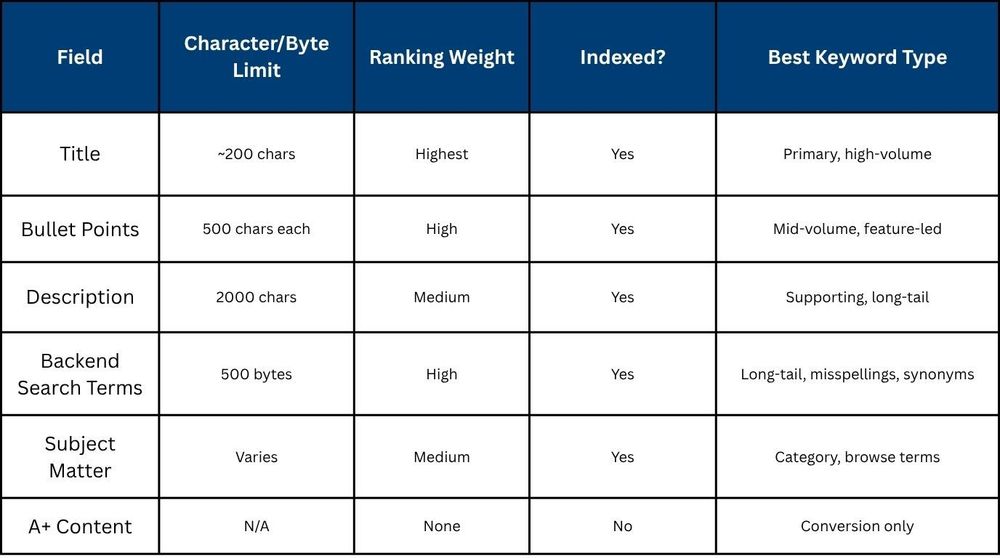
Quick Reference Table: Keyword Placement by Field (2026)
Use this table as your go-to reference when deciding where each keyword type belongs. Every field has a defined role, treating them as interchangeable is where most Amazon keyword placement in listing strategies breaks down.
What Keyword Mistakes Are Silently Killing Your Amazon Rankings in 2026?
Most listing problems are not obvious. They do not trigger a warning in Seller Central. They simply drain ranking potential quietly over time. Here are the six mistakes that show up most consistently in underperforming Amazon product listing keyword optimization audits.
- Stuffing Keywords Into the Titles: A10 treats keyword-heavy titles as low-quality signals, and the resulting drop in click-through and conversion rate progressively pushes your listing down in rank.
- Repeating Title Keywords in the Backend Field: Amazon deduplicates across your entire listing, so any keyword already in your title is already indexed and repeating it in the backend simply wastes bytes that could hold a new term.
- Using the 250-Byte Assumption: The backend field limit has been 500 bytes since 2023, and sellers still working from outdated guides are leaving half their indexing capacity unused.
- Ignoring the Subject Matter Field: These fields give you up to 250 additional characters of indexing space, get indexed within 20 minutes, and directly feed Amazon's Browse Node classification, leaving them blank is silently costing you visibility.
- Misusing the Target Audience Field: Filling this with overly narrow terms can limit your product's search exposure. Be specific but strategic, or leave it blank if your product has a broad audience.
- Misaligned Listing and PPC Keywords: When your ad targets a keyword that does not appear in your listing copy, Amazon's relevance score drops, raising your cost per click and weakening campaign performance simultaneously.
How Xneeti Aligns Listing Keywords With PPC Campaign Architecture
Most sellers build their listing and their ad campaigns in isolation, and that disconnect is precisely what causes keyword spend to bleed without producing proportional ranking gains. Xneeti is built to unify both sides of that equation under one coordinated Amazon listing keyword strategy.
Xneeti is a multi-marketplace AI platform built by ex-Amazon experts and ex-Google engineers, with every capability developed natively in-house, not stitched together from third-party tools. Where traditional approaches treat listing optimisation and ad management as separate workstreams, Xneeti's natively built AI runs both under one coordinated Amazon listing keyword strategy, continuously, in real time.
- Misaligned Keywords Bleed Budget: When listing copy and ad targets do not match, Amazon penalizes relevance, your CPC rises, and your organic rank never builds momentum.
- The Relevance Flywheel: Xneeti aligns your listing keywords with campaign targets so paid traffic converts faster, feeds organic ranking signals, and compounds into lower ACoS over time.
- One SOP, Every Field, Every Campaign: Xneeti's keyword mapping process assigns every keyword tier to the right listing field and the right campaign match type, so nothing is misplaced and nothing is wasted.
- Scalable Across Your Entire Catalog: Whether you are managing 10 or 200 ASINs, Xneeti's repeatable framework ensures that how to optimize Amazon listing keywords at scale never becomes a guessing game.
Final Thoughts
Adding keywords to Amazon listings correctly means placing the right terms in the right fields, keeping backend space free of duplication, and ensuring every keyword pulls weight across both organic and paid channels. Most listings have gaps in at least two of those three areas. The sellers closing those gaps are the ones compounding rank, while others stagnate.
Ready to Stop Guessing and Start Ranking?
Xneeti is a multi-marketplace AI platform built specifically to audit, align, and optimise Amazon search terms backend keywords across your entire catalog from title to backend field to PPC campaign structure. Our natively built AI and dedicated account management teams have helped brands cut wasted ad spend, improve organic visibility, and build listings that perform without constant intervention. Book a listing keyword audit with Xneeti today and find out exactly where your rankings are being held back.


