

Most Amazon sellers don't have an ads problem. They have a margin problem disguised as one. In 2026, CPCs have climbed across nearly every category while conversion rates have stayed flat, meaning every click costs more and delivers the same result. For sellers already stretched thin, reducing PPC costs on Amazon has stopped being a quarterly goal and become a weekly survival task.
Amazon's own filings show its advertising revenue crossed $68 billion in 2025, up 22% year-over-year. That money came from sellers bidding against each other in an increasingly crowded auction. Xneeti's work across 80+ seller accounts shows that 20–30% of ad spend is recoverable in most mature campaigns through structure alone, not bid cuts. In this blog, we cover 11 proven fixes that show you exactly how to reduce Amazon PPC costs without touching sales velocity.
| # | Strategy | What it fixes | Impact window |
| 1 | Weekly negative keyword audits | Wasted spend on irrelevant search traffic | Days |
| 2 | Auto-to-exact keyword harvesting | Match-type tax on proven converters | 1–2 weeks |
| 3 | Listing CVR optimization | High click cost with low conversion rate | 2–4 weeks |
| 4 | Placement bid modifiers | Budget defaulting to low-converting placements | 1 week |
| 5 | Branded/non-branded separation | Non-branded ACoS masked by branded performance | 1–2 weeks |
| 6 | 80/20 budget reallocation | Budget funding underperformers instead of winners | Days |
| 7 | TACoS tracking | Organic decline hidden behind flat ACoS | Ongoing |
| 8 | Dayparting | Off-peak spend with near-zero conversion | 1–2 weeks |
| 9 | Exact match migration | Overspend on broad and phrase match traffic | 1–2 weeks |
| 10 | Placement report audit | Rest-of-search budget waste going undetected | 1 week |
| 11 | Kill list system | Chronic underperformer drain across the account | Weekly |
The 11 Proven Ways to Reduce Amazon PPC Costs
The strategies below are ordered by impact speed, not complexity. The first few deliver recoverable savings within days. The latter ones rebuild the structure that makes those savings permanent. Work through them in sequence for the fastest results.
1. Run weekly negative keyword audits to stop wasted spend compounding
Yes. In most underaudited accounts, this single task recovers more Amazon PPC wasted spend than any bid adjustment ever will.
Every time a shopper searches a term that triggers your ad but does not buy, that click is a direct loss. Without a weekly audit, those terms keep triggering, keep spending, and keep delivering nothing. The damage does not show up dramatically in one report. It compounds quietly across hundreds of irrelevant clicks every month.
The longer a campaign runs without a negative keyword audit, the more budget it quietly hands over to searches that were never going to convert.
What to look for in your Search Term Report:
- Search terms with 5 or more clicks and zero conversions
- Queries that share a word with your target keyword but signal a completely different intent
- Broad match and phrase match spillover pulling traffic from unrelated categories
The weekly audit, step by step:
- Pull your Search Term Report from Amazon Campaign Manager every Monday.
- Filter by spend above your target cost-per-order with zero sales in the last 7 days.
- Add confirmed waste terms as a negative exact match at the ad group level, not campaign level, to avoid blocking converting traffic elsewhere in the account.
One level beyond basic negation is n-gram analysis. Rather than reviewing individual search terms one at a time, n-gram analysis breaks terms into two and three-word patterns to identify which word combinations are silently draining budget across multiple keywords. It is the difference between patching individual leaks and finding the pipe that is causing all of them.
2. Harvest converting auto campaign terms into dedicated exact match campaigns
Auto campaigns are discovery tools. They cast a wide net, find what converts, and hand you the data. But most sellers stop there, they let winning search terms keep running inside the auto campaign indefinitely, paying broad match rates for traffic they could be owning at exact match precision.
That gap between what you are paying and what you could be paying is the match-type tax. It compounds every single day the harvest does not happen.
This is one of the most straightforward Amazon PPC optimization tips that directly reduces cost per conversion without touching a single bid.
The harvest workflow, step by step:
- Pull your Search Term Report from Campaign Manager and filter for search terms with 3 or more conversions in the last 30 days.
- Add those converting terms as exact match keywords in a dedicated manual campaign with a bid aligned to your target ACoS.
- Add the same terms as a negative exact match inside your auto campaign, so both campaigns do not compete against each other for the same traffic.
That last step is the one most sellers skip. Without it, your auto and manual campaigns bid against each other, driving up your own costs from within.
3. Fix your listing CVR before adjusting a single bid
Ads bring traffic. The listing closes the sale. When a listing fails to convert, every click your campaign generates becomes a sunk cost, and no bid adjustment in the world fixes that.
This is the most underused lever in improving Amazon PPC profitability. Most sellers optimize bids before they ever look at what happens after the click. That order is backward.
A listing that converts at 8% versus one that converts at 12% is not a small difference. At the same ad spend, the second listing generates 50% more sales from identical traffic. That is the kind of efficiency no bid strategy can replicate.
According to Amazon's own data, adding A+ Content to product listings can increase sales by an average of 5.6%, and that is before accounting for the compounding effect on ad efficiency.
Listing CVR audit checklist:
- Main image: Does it immediately communicate what the product is and who it is for, without the customer needing to read a word?
- Bullet points: Are they benefit-led or just feature lists? Customers buy outcomes, not specifications.
- A+ Content: Is it present, and does it answer the questions a buyer would have before purchasing?
- Rufus and A10 readiness: Is your listing structured to answer direct product questions the way Amazon's AI shopping assistant surfaces results? Conversational, specific, and benefit-focused content performs better here.
- Price and reviews: Are both competitive enough that a converting-intent visitor does not bounce before adding to cart?
4. Use placement bid modifiers to send budget where it actually converts
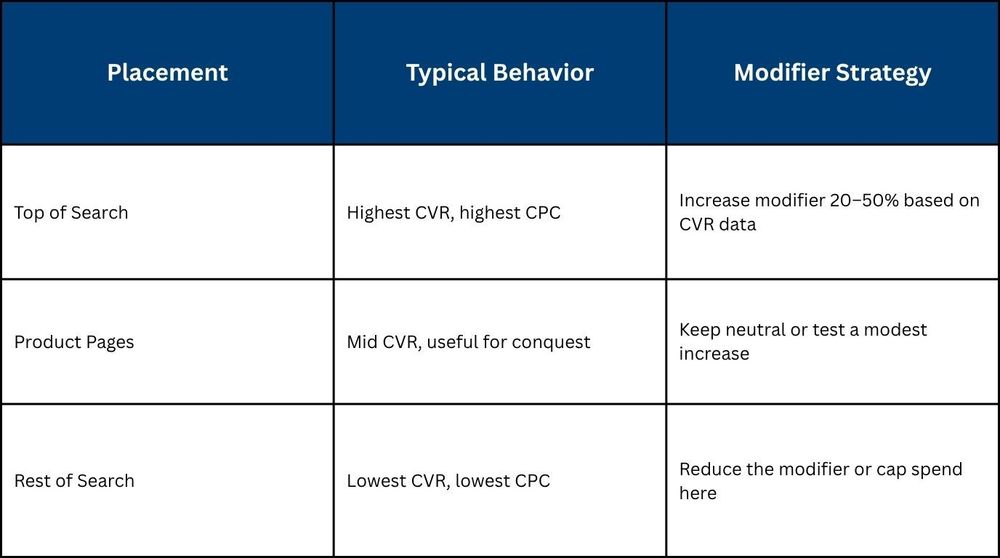
Without placement modifiers, Amazon decides where your budget goes. That is not always a bad thing, until you check the placement report and realize most of your spend landed on rest-of-search and product pages, while top-of-search, your highest-converting placement, barely got a look in.
Top-of-search placements consistently convert at a significantly higher rate than other placements. The traffic intent is stronger, the visibility is higher, and the buyer is closer to a purchase decision. Letting spend default across all placements equally means paying the same for very different outcomes.
Placement bid modifiers give you direct control over this. You can increase your bid by a set percentage for top-of-search, specifically, without changing your base bid across the rest of the campaign. The result is more budget flowing to the placement that earns it, which is one of the most direct ways to reduce Amazon ad spend waste without cutting overall investment.
How to read and act on your Placement Report:
Three steps to set this up:
- Go to Campaign Manager, select a Sponsored Products campaign, and open the Placements tab.
- Review CVR and ACoS by placement, identify where your spend is going versus where conversions are coming from.
- Apply a top-of-search modifier based on the CVR gap, start at 20%, and adjust weekly based on results.
The modifier does not guarantee top-of-search wins. It raises your ceiling for that placement so your budget competes where it matters most.
5. Separate branded and non-branded campaigns to see where spend actually bleeds
Most sellers run branded and non-branded keywords inside the same campaigns. It feels efficient, fewer campaigns, simpler reporting. But the performance picture it creates is misleading.
Branded keywords convert at higher rates and lower CPCs than non-branded ones. When both live in the same campaign, strong branded performance masks how poorly non-branded keywords are actually doing. Your ACoS looks acceptable. Your non-branded spend is bleeding.
Separating them is one of the most clarifying moves in Amazon PPC cost reduction strategies because it reveals exactly where the waste is hiding.
What separation gives you:
- A true read on non-branded performance without branded conversions inflating the numbers.
- Different ACoS targets for each, branded campaigns run leaner, non-branded campaigns held to stricter efficiency thresholds.
- Budget control by intent, branded spend protects existing demand, and non-branded builds new demand.
How to approach the split:
- Identify every keyword containing your brand name, product line, or any variation that a returning customer would search.
- Move these into a dedicated branded campaign with its own budget and ACoS target.
- Place all category keywords, generic descriptors, and competitor-adjacent terms into separate non-branded campaigns measured independently.
Once separated, your non-branded ACoS will likely be higher than the blended number suggested. That is not a new problem. It is an existing one that finally has a number attached to it.
6. Reallocate budget away from your bottom 80% to the campaigns already working
In most Amazon accounts, a small number of campaigns carry the majority of profitable revenue. The rest consume budget, generate clicks, and contribute very little to the bottom line. The 80/20 rule is not a theory here, it is a pattern that shows up consistently across accounts of every size.
The instinct is to fix underperforming campaigns. The faster move is to stop funding them and redirect that budget to what is already working.
This is one of the quickest ways to cut Amazon advertising costs without reducing overall sales output because you are not spending less, you are spending smarter.
sales output because you are not spending less, you are spending smarter.
How to identify your top 20%:
- Sort all campaigns by revenue generated over the last 60 days.
- Flag campaigns that consistently deliver below your target ACoS with strong conversion volume, these are your budget priorities.
- Identify campaigns that have consumed significant spend over 30 days with zero or minimal orders, these are your reallocation candidates.
Threshold metrics that signal reallocation:
- Spend above your average cost-per-order with fewer than 2 conversions in 30 days.
- ACoS is running more than 20% above your account-level target for 4 consecutive weeks.
- CTR below 0.3% with high impression volume, the campaign is visible but not relevant.
The reallocation process:
- Do not pause underperformers immediately, reduce their daily budget by 50% first and monitor for one week.
- Redirect the freed budget to your top-performing campaigns in increments, not all at once.
- Reassess the reduced campaigns after 14 days, if nothing improves, pause and reallocate fully.
7. Track TACoS weekly, not just ACoS, to catch organic decline before it compounds
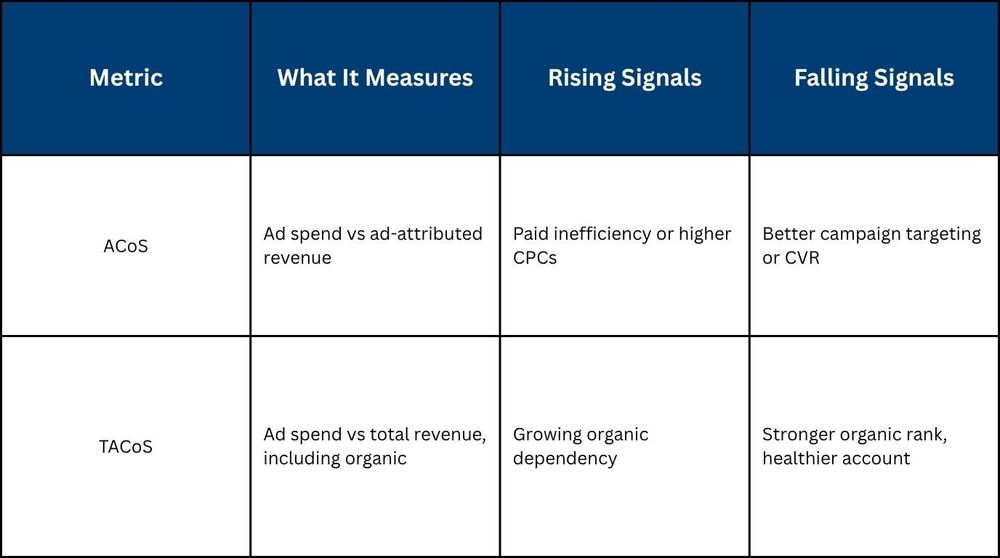
ACoS tells you how efficiently your ads generate paid revenue. It is a useful number, but it only shows half the picture. It says nothing about what is happening to your organic sales while your campaigns run.
That is where TACoS comes in. Total Advertising Cost of Sale measures your ad spend against your total revenue, paid and organic combined. When TACoS climbs while ACoS stays flat, it means organic sales are shrinking. Your ads are not becoming less efficient. Your business is becoming more dependent on them.
That is the distinction most sellers miss, and it is one of the clearest signals that an account needs structural attention to lower Amazon ACoS sustainably rather than just manage it campaign by campaign.
How to calculate TACoS:
TACoS = (Total Ad Spend ÷ Total Revenue) x 100
Pull total ad spend from Campaign Manager and total revenue from your Business Reports in Seller Central. The gap between the two is your organic contribution.
ACoS vs TACoS: What each metric is actually telling you:
The divergence to watch:
If ACoS is stable but TACoS is climbing, organic is declining. If both are falling together, your ads are building rank, and the account is in a healthy growth cycle. If TACoS is falling while ACoS holds steady, organic is strengthening without needing more ad spend to maintain it.
8. Cut spend during low-converting hours using dayparting workarounds
Every Amazon campaign runs 24 hours a day by default. That sounds thorough. In practice, it means a portion of your daily budget is spent during hours when shoppers are browsing without intent to buy, and those clicks cost the same as the ones that convert.
This is one of the more overlooked Amazon PPC optimization tips because Amazon does not offer native dayparting. But that does not mean the lever does not exist.
How to identify your low-conversion windows:
Pull your campaign data from the Campaign Manager and cross-reference it with your order reports by time of day over a 30 to 60 day window. Look for patterns, hours or day-parts where clicks are consistent, but conversions drop significantly. Early morning windows and late-night hours are common culprits, though this varies by category and audience.
Workarounds that give you time-based control:
- Rule-based bid adjustments: Set automated rules inside Campaign Manager to reduce bids by a fixed percentage during identified low-conversion windows, and restore them during peak hours.
- Budget scheduling: Allocate a smaller daily budget to campaigns that run overnight, and a larger share to those active during your highest-converting windows.
- Third-party scheduling tools: Platforms that integrate with the Amazon Ads API allow more granular hour-by-hour bid control if your account scale justifies the additional layer.
One risk worth noting:
Over-restricting hours can suppress impression volume during windows that contribute to organic rank, even without direct conversions. The goal is not to eliminate off-peak spend entirely, it is to reduce it proportionally based on actual performance data, not assumptions.
9. Migrate your top-converting keywords from broad and phrase into exact match
Every keyword you run on a broad or phrase match is a controlled experiment with an open door. Amazon matches it to searches you did not choose, some of which convert, many of which do not. For new campaigns, that openness is useful. For your top-performing keywords, it is a liability.
Broad and phrase match have their place, but leaving high-converting keywords in those match types indefinitely is one of the most common ways accounts quietly overspend. Exact match creates a controlled, auditable lane where you know exactly what search triggered your ad, what it cost, and whether it converted. That precision is how you reduce Amazon PPC costs at the keyword level without sacrificing volume on terms that are already proven.
How to identify keywords ready for exact match migration:
- Pull your Search Term Report and filter for terms with 5 or more conversions in the last 30 days running on broad or phrase match.
- Cross-reference against ACoS; terms converting at or below your target are your migration candidates.
- Prioritize by spend volume, the highest-spend converters give you the biggest efficiency gain when moved to exact.
How to migrate without disrupting performance:
- Add the converting term as a new exact match keyword in a dedicated manual campaign.
- Set the exact match bid at your current effective CPC for that term, not lower.
- Add the same term as a negative exact in the original broad or phrase campaign to prevent both from competing against each other.
- Monitor for 14 days before adjusting bids in either direction.
When to keep the broad match running:
- During active discovery phases, when you are still building a keyword list.
- For new ASINs with fewer than 30 days of data.
- When entering a new category or seasonal market, where search behavior is still unknown.
What bid differential to apply:
Exact match bids can typically run 10 to 20% higher than your broad match equivalent because the traffic quality is tighter and conversion rates are more predictable. The higher bid is justified by the lower waste.
10. Read your placement report to find where budget quietly leaks by placement
Most sellers know their overall ACoS. Very few know how that number breaks down by placement. The Placement Report closes that gap, it shows exactly what you spent on top-of-search, rest-of-search, and product pages, and what each placement returned in return.
What it typically reveals is uncomfortable. Rest-of-search consistently absorbs a disproportionate share of budget across most accounts, often at the lowest CVR of the three placements. The clicks are cheaper, which makes the spend look reasonable in aggregate. But cheaper clicks that do not convert are still Amazon PPC wasted spend, just slower and harder to see.
How to pull the Placement Report:
Amazon makes this straightforward through the Placement Report inside Campaign Manager, and running it regularly is one of the fastest ways to surface recoverable spend.
Go to Campaign Manager, select a Sponsored Products campaign, and navigate to the Placements tab. The data breaks down impressions, clicks, spend, sales, and ACoS by each of the three placements. Run this across your top five to ten campaigns by spend first, that is where the recoverable waste is largest.
Thresholds that should trigger action:
- Rest-of-search ACoS running more than 30% above your campaign target, reduce or cap spend here.
- Product page spend exceeding 25% of total campaign budget with ACoS above target, review ASIN targeting, and consider negative product exclusions.
- Top-of-search receiving less than 40% of total impressions despite strong CVR, placement modifiers are likely underutilized.
11. Build a kill list to stop chronic underperformers from draining budget week after week
A kill list is not a dramatic name for pausing bad keywords. It is a weekly maintenance system, a documented review of every target across your campaigns that has consumed spend above a defined threshold without producing a conversion. Without it, underperforming keywords, ASINs, and placements stay active indefinitely, quietly draining budget that better-performing targets could use.
This is the discipline that makes reducing PPC costs on Amazon a system rather than a reaction.
Three criteria that earn a target a place on the kill list:
- Any keyword or ASIN target that has spent 2x your target cost-per-order with zero conversions in the last 14 days.
- Any placement consuming more than 20% of the campaign budget with an ACoS running more than 35% above your account target for four consecutive weeks.
- Any auto campaign target that has triggered clicks across 10 or more search terms with no orders in 21 days.
Pausing vs negating: Why the distinction matters:
Pausing a keyword stops it from spending but leaves it recoverable. Negating it permanently blocks that search term from triggering your ad. Pausing is appropriate when the keyword has potential but needs more data. Negating is the right call when the search term is structurally irrelevant, no amount of time or optimization will make it convert.
What 5 Metrics Should You Be Watching Every Week?
Most sellers check ACoS once a week and react. By then, the damage is already done. A five-metric weekly dashboard catches inefficiency while it is still recoverable.
Here is what to track and when to act:
- ACoS by keyword: Not campaign average. If a keyword exceeds your target ACoS by 25% for two consecutive weeks, it needs a bid reduction or a pause.
- TACoS at portfolio leveL: If TACoS rises while ACoS holds steady, organic is declining. That is the signal to lower Amazon ACoS through listing and rank fixes, not more ad spend.
- CTR by placement: Below 0.2% on top-of-search means a targeting or creative problem. Bidding more will not fix it.
- CVR by campaign: A 15% week-over-week drop without a listing change points to a traffic quality issue, not a bid issue.
- Spend vs budget pacing: Consistent underspend during high-CVR hours means your budget cap is limiting your best campaigns. Raise it selectively to improve Amazon PPC profitability.
How Does Xneeti Cut Costs While Scaling Across 50+ ASINs Without Manual Hours?
Most sellers run these optimizations manually, one report, one campaign, one week at a time. Xneeti's AI runs every one of them continuously across your entire account, while a dedicated account strategist reviews every decision the system makes. For brands serious about reducing PPC costs on Amazon, Xneeti is not another tool to manage, it is the operating system that manages it all.
- Hourly bid optimization by placement: Xneeti's AI adjusts bids by hour, day, and placement level based on your account's actual conversion patterns, not category averages, so your budget always flows to where it performs.
- N-gram analysis that catches bleeders early: Instead of waiting for wasted spend to appear in a monthly ACoS report, Xneeti's system identifies damaging search term patterns and adds negatives before the damage compounds, directly reducing Amazon PPC wasted spend across the account.
- Auto-to-exact harvest and listing intelligence: Converting search terms are migrated automatically from auto to exact match campaigns, while listing content is continuously optimized for both Amazon's A10 algorithm and Rufus, Amazon's AI shopping assistant, keeping paid and organic performance aligned.
- Human oversight at every step: With an account-to-manager ratio 50% below the industry standard, every AI-driven decision is reviewed by a dedicated strategist who owns your account like it is their own business, built by founders who managed Amazon's seller programs from the inside.
Ready to Stop Patching and Start Scaling?
Rising ACoS in 2026 is a structural problem, not a campaign one. The eleven tactics in this guide form the architecture of a cost-efficient account, and sellers who run them as a connected system are the ones who grow revenue without watching margins shrink with every passing month.
Xneeti runs this entire system natively, AI-powered, human-reviewed, and built by the team that helped design the seller programs Amazon operates today. Brands across categories are averaging a 50% TACoS reduction and 30% revenue growth without the manual hours that usually come with it. If your account is ready for that kind of structure, book a demo with Xneeti and see what the first audit uncovers.


