

Static image ads are no longer as effective in Amazon search as they once were. With more sellers targeting the same keywords, simply appearing in results does not guarantee engagement. Amazon video Ads add movement inside the search grid, helping listings stand out in a space dominated by static visuals. For brands already running PPC campaigns, video is increasingly becoming a performance tool rather than just a branding add-on.
Amazon internal data shows that early testing of Sponsored Products campaigns with video delivered up to a 9% uplift in click-through rate (CTR) compared to campaigns without video, according to Amazon Ads data from 2025.
Many advertisers exploring Amazon Sponsored Brands video ads are discovering that structured creative and media alignment matter more than budget increases. Platforms like Xneeti OneOS help sellers connect video strategy with measurable growth, turning engagement into scalable performance rather than isolated tests. This article explains how to create, launch, and optimize Amazon video campaigns strategically, so brands can convert engagement into measurable performance growth.
What Are Amazon Video Ads and Why Are They Replacing Static Search Ads?
Amazon video Ads are short video advertisements that appear within Amazon’s search results and product detail pages. They autoplay as shoppers browse, so the product can be shown in action while people scroll. This helps brands demonstrate features and attract attention directly inside the shopping experience.
Where do Amazon video ads appear?
Amazon video placements sit inside high-intent parts of the store:
Within search results, appearing between sponsored and organic listings, where shoppers are actively looking.
On product detail pages, helping a listing stand out when buyers compare similar items.
In related product placements, catching shoppers who are already weighing alternatives.
These ads live inside the shopping experience, they reach people who are further down the funnel. That shift changes how views turn into clicks and how clicks turn into purchases.
Why are they replacing static ads?
Static ads usually compete through higher bids and wider keyword coverage. That works, but it also means spending more just to stay visible. Video shifts the focus. Instead of fighting only on bids, it pulls attention through movement and by showing the product in use right away.
According to Wyzowl’s 2025 Video Marketing Statistics report, notes that 74% of consumers say they have bought a product after watching a brand video, which reflects how strongly visual proof affects buying behavior. For brands facing flat CTR despite solid targeting, formats like Amazon Sponsored Products video provide another way to compete without simply increasing bids.
Which Type of Amazon Video Ad Should You Run?
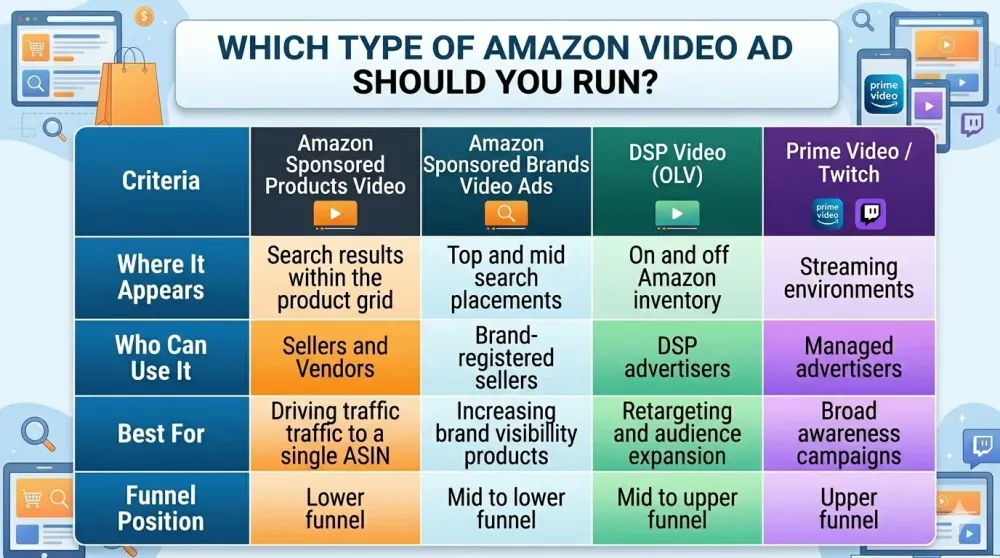
The right Amazon video Ads format depends on what you’re trying to achieve and where you want visibility in the buying journey. Most sellers focused on performance begin with search placements and then expand into broader video inventory once results become consistent.
Below is a simplified comparison to remove format confusion.
When to Choose Amazon Sponsored Products Video
This format usually makes sense when the objective is direct-response performance tied to specific keywords, because it sends traffic straight to a single product detail page.
It is often a strong fit for campaigns that already have dependable keyword data and are looking for incremental CTR gains without changing the broader campaign structure.
When to Choose Amazon Sponsored Brands Video Ads
This format becomes more relevant when the goal shifts toward broader brand visibility across multiple ASINs.
It gives sellers space to reinforce brand presence in search results while still capturing demand in competitive categories.
When to Consider DSP or Prime Video
These formats are built differently from search-based Amazon video Ads. Instead of responding to keyword intent in real time, they use behavioral data and audience signals to decide who sees the ad.
You should consider DSP or Prime Video if:
Your brand wants to reconnect with past shoppers across Amazon-owned and external properties to improve repeat purchase behavior.
You are putting budget toward upper- or mid-funnel visibility, where the goal is to shape perception before direct search even begins.
Your search campaigns, including Amazon Sponsored Products video, are already performing consistently, and you need additional scale without forcing more spend into competitive keyword auctions.
Who Is Eligible to Run Amazon Video Ads and What Is the Approval Process?
Eligibility depends on Brand Registry and campaign type. Access to different formats of Amazon video Ads is determined by your account structure, trademark status, and whether you are running search-based campaigns or DSP inventory.
Brand Registry Requirements
Brand Registry is the foundation for most search-driven video formats.
Trademark Ownership: You must own a registered trademark in the country where you plan to advertise. The trademark must match the brand name used in your listings and campaigns.
Active Brand Registry Enrollment: Simply having a trademark is not enough. The brand must be fully enrolled and verified in the Amazon Brand Registry.
Listing Alignment: The product detail page must clearly reflect the brand identity shown in the video. Any mismatch between video content and ASIN listing details can lead to rejection.
Campaign Eligibility Based on Format: Formats like Amazon Sponsored Brands video ads are strictly restricted to brand-registered sellers. Without Brand Registry, this placement is unavailable.
Seller vs Vendor vs DSP Access
Not every advertiser gets every placement; format access comes down to account type and the format you want to run.
Seller and Vendor Central Accounts: Both sellers and vendors can launch Amazon Sponsored Products video campaigns when their listings meet Amazon’s ad standards and the ASINs are eligible. Expect basic checks on listing quality and content before you can advertise with video.
Sponsored Brands Access: This format is reserved for brand-registered advertisers and must be set up through Sponsored Brands in the Ads Console. If you don’t have Brand Registry, this placement won’t be available.
Amazon DSP Access: DSP video placements, including OLV and streaming inventory, usually require Amazon DSP access, which can mean managed-service onboarding or minimum spend commitments depending on the region. It’s a different operating model than Seller/Vendor PPC.
Streaming Inventory (Prime Video / Twitch): These placements commonly need deeper approvals and are typically used by advertisers focused on broader reach rather than immediate search capture.
Approval Timeline and Review Process
Every video goes through Amazon’s moderation before it can run. Plan for a review step, it’s part of the normal workflow.
Creative Review Standards: Videos must meet the current Amazon video ad specs for length, file type, resolution, and size. Hitting the specs up front avoids avoidable rejections.
Content Accuracy Checks: Any claims shown in the video must match the product detail page; unsupported claims, medical assertions, or exaggerated benefits are common reasons for a reject. Keep demonstrations truthful and verifiable.
Brand Safety & Policy Compliance: Ads cannot include prohibited language, improper competitor comparisons, or misleading demonstrations. Staying conservative on claims speeds approval.
Review Timeframe: Most approvals finish in 24–72 hours, though peak seasons can stretch that window. Allow extra time around major retail events to avoid launch delays.
Where Do Amazon Video Ads Appear in the Customer Journey?
Most high-impact placements are inside search results. That is where intent is strongest and where Amazon video Ads often deliver the fastest measurable results. Beyond search, video also appears in comparison environments and streaming placements, each affecting a different stage of the buying journey.
1. Search Results
Search placements place video directly within the product grid alongside organic and sponsored listings. Formats such as Amazon Sponsored Brands video ads autoplay as shoppers scroll, so attention is captured quickly. As users are actively searching, this placement reaches buyers at the point of evaluation.
2. Product Detail Pages
On product detail pages, the video ads appear near competitor listings during the comparison stage. Shoppers here are reviewing options rather than discovering new categories. Video helps clarify product value at the moment decisions are being narrowed down.
3. Prime Video & Fire TV
Streaming placements run inside entertainment content rather than within search results. These ads are usually accessed through DSP or managed services and are meant for broader visibility. Their role is to build awareness and consideration, not to capture immediate keyword-based conversions.
4. Off-Amazon OLV (Online Video)
OLV placements run video ads across external publisher networks and depend more on audience data than direct search intent. They work best when the goal is to reconnect with previous visitors or reach people who are not actively searching yet. Unlike search-based Amazon video Ads, OLV usually supports earlier-stage engagement rather than immediate purchase decisions.
What Are the Current Amazon Video Ad Specs and Policy Requirements?
Amazon video ad specs change slightly by format, but search placements still need to follow clear rules around length, resolution, file size, and policy standards. If those basics are missed, approval can slow down, or the creative may be rejected.
Below is a simplified reference guide for search-based video placements within Amazon’s advertising console.
Core Technical Specifications (Search Placements)
Requirement - Standard Guideline
Video Length - 15–45 seconds (recommended 15–30 seconds for search)
Aspect Ratio - 16:9 (landscape)
Resolution - Minimum 720p (1280 × 720)
File Format - .mp4 or .mov
Maximum File Size - Typically up to 500 MB
Audio - Optional; must not rely on sound for clarity
Thumbnail - Auto-generated or approved custom thumbnail
These specifications may evolve, so advertisers should verify the latest Amazon video ad specs inside the Ads Console before uploading.
Why Do Amazon Video Ads Deliver Higher CTR and Conversion Rates?
Amazon Video Ads tend to outperform static formats because they add movement to high-intent search environments. When shoppers are already comparing options, that movement makes a difference at the exact moment they’re deciding where to click.
Inside search results, static ads depend heavily on image quality and titles. Video shifts that balance. As users scroll, autoplay clips stand out naturally and surface product use before a shopper has fully evaluated the surrounding listings.
Amazon Advertising notes that Sponsored Products video appears directly within search results, autoplaying as shoppers browse. That placement lets brands show product features inside the buying flow itself, rather than pulling users away from it. Demonstrating value early increases the chances of both engagement and more qualified clicks.
For advertisers seeing flat CTR even with strong keyword targeting, this added visibility can drive meaningful traffic gains without automatically pushing bids higher.
Shopper Intent Advantage
Unlike social platforms, where video often creates demand, Amazon Sponsored Products video captures existing demand. The user is already searching for a product category. Video simply improves the way that the product is presented within the search grid. That difference explains why performance impact is measurable rather than speculative.
Early-Mover Advantage
Even though adoption is increasing, many brands still depend mainly on static ads. That leaves a short window where sellers using video can stand out more easily. As more competitors adopt video, the edge will shift from simply having it to using it more effectively.
How Do You Create High-Converting Amazon Video Ads?
High-converting videos make product clarity the priority in the first three seconds. In search placements, shoppers move fast, so relevance must register immediately for Amazon video Ads to improve click-through.
1. First 3-Second Hook
Show the product in use right away, skip long brand opens or cinematic lead-ins. If viewers see the item solving a problem in those first frames, they are more likely to stop and click.
2. Text Overlay Rules
Use short, mobile-friendly text that highlights a single clear benefit. In Amazon Sponsored Products video, high-contrast captions matter because many viewers never turn the sound on.
3. Demonstration vs. Lifestyle Balance
For lower-funnel search placements, demonstration usually outperforms mood-driven scenes. Lifestyle shots can add context, but they should never replace a clear view of the product working.
4. No Sound Dependency
Assume autoplay is silent: the narrative must work visually. Focus on product action, close-ups, and readable on-screen text rather than voiceover cues.
5. Compliance Checklist
Match every claim in the video to the product detail page to avoid moderation issues. Always verify the latest Amazon video ad specs before upload, technical mismatches are a common cause of rejection.
How Do You Set Up Amazon Video Ads Step-by-Step?
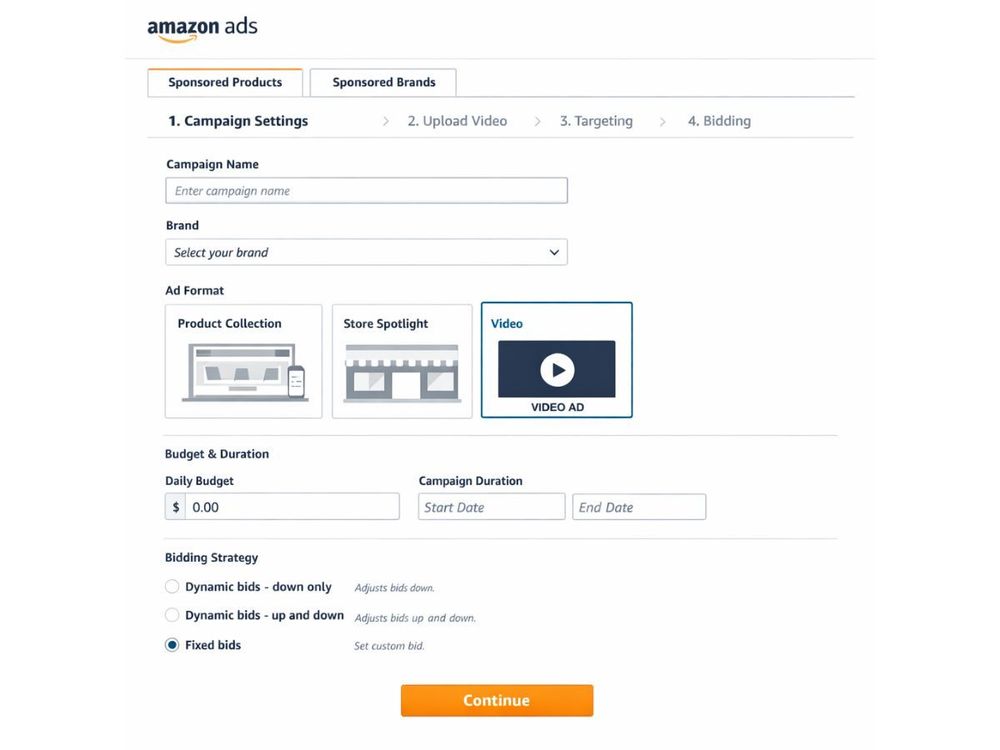
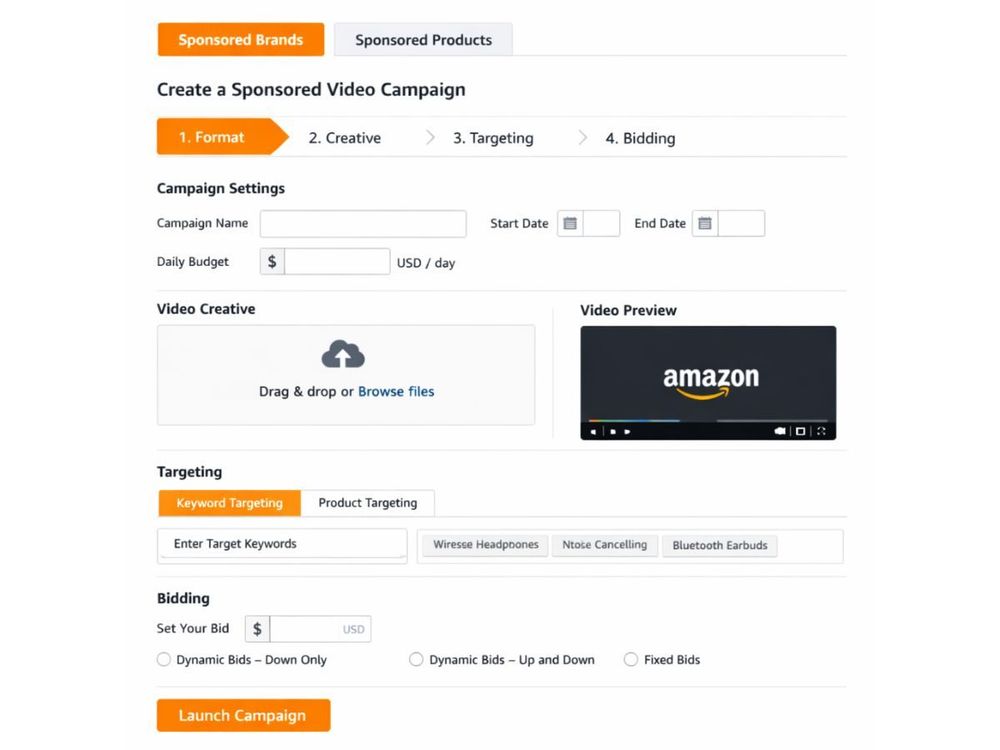
Video campaigns are built inside Sponsored Brands or Sponsored Products in the Ads Console. Setting up Amazon video Ads requires aligning format, creative, targeting, and bidding into one structured workflow.
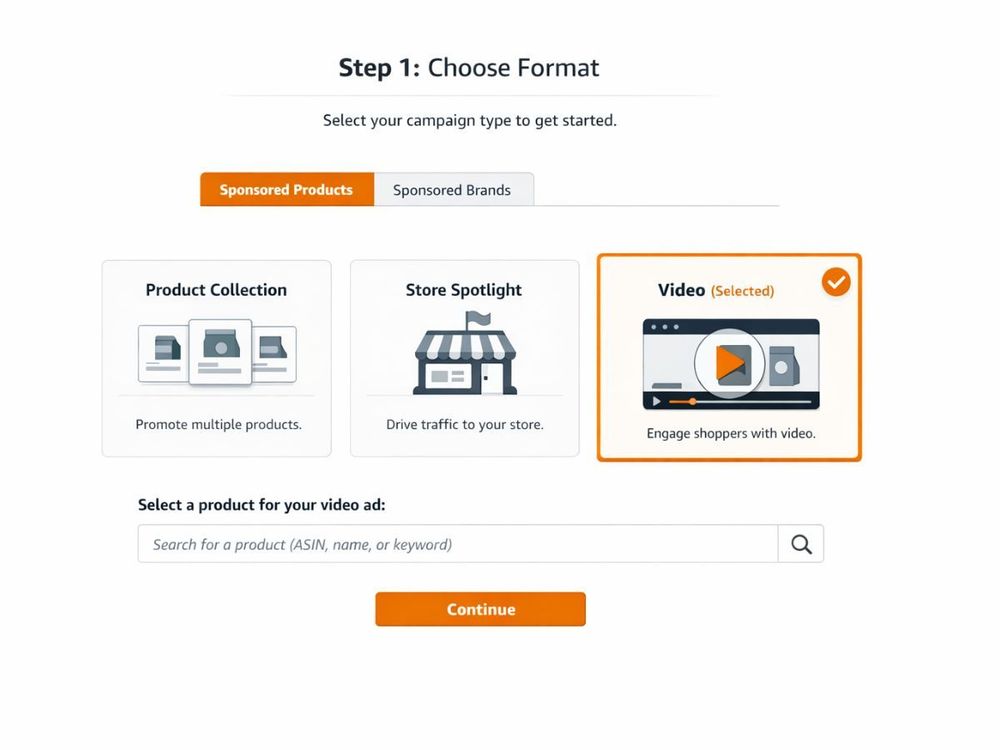
Step 1: Choose Format
Select the campaign type based on your objective and eligibility within the Ads Console. Many performance-focused sellers begin with Amazon Sponsored Products video because it connects directly to a single ASIN and captures search intent efficiently.
Step 2: Upload Video
Upload your creative during campaign setup and ensure it meets the current Amazon video ad specs before submission. Technical compliance reduces approval delays and prevents unnecessary resubmissions.
Step 3: Select Targeting
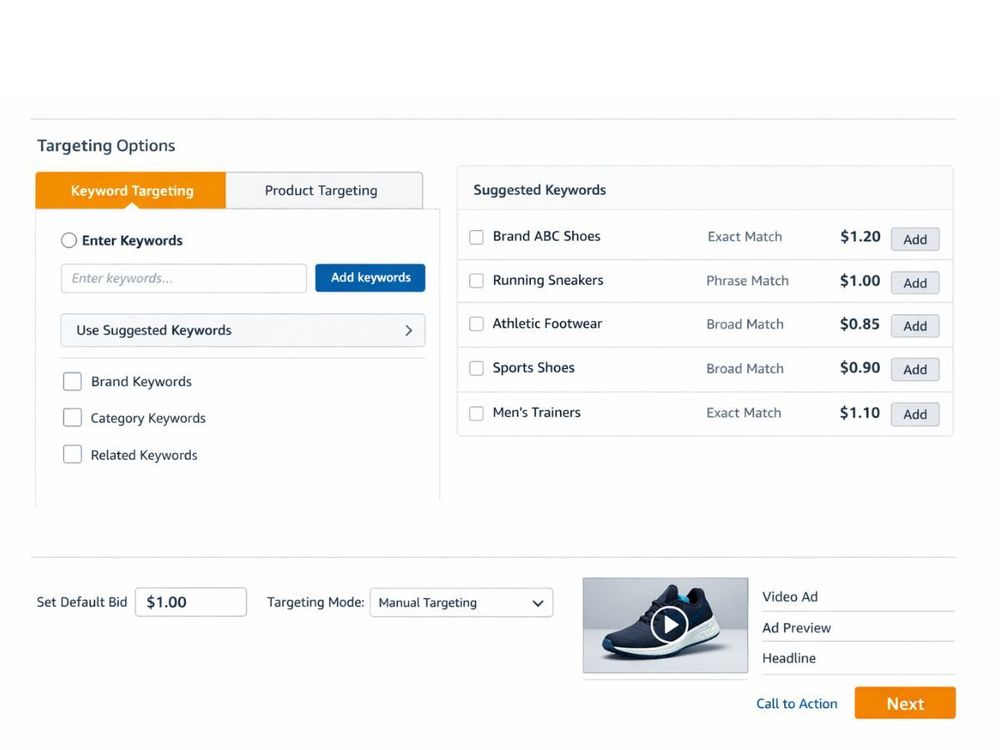
Choose keyword or product targeting based on historical performance data and campaign goals. When running Amazon Sponsored Brands video ads, advertisers often align targeting with branded or category-level queries.
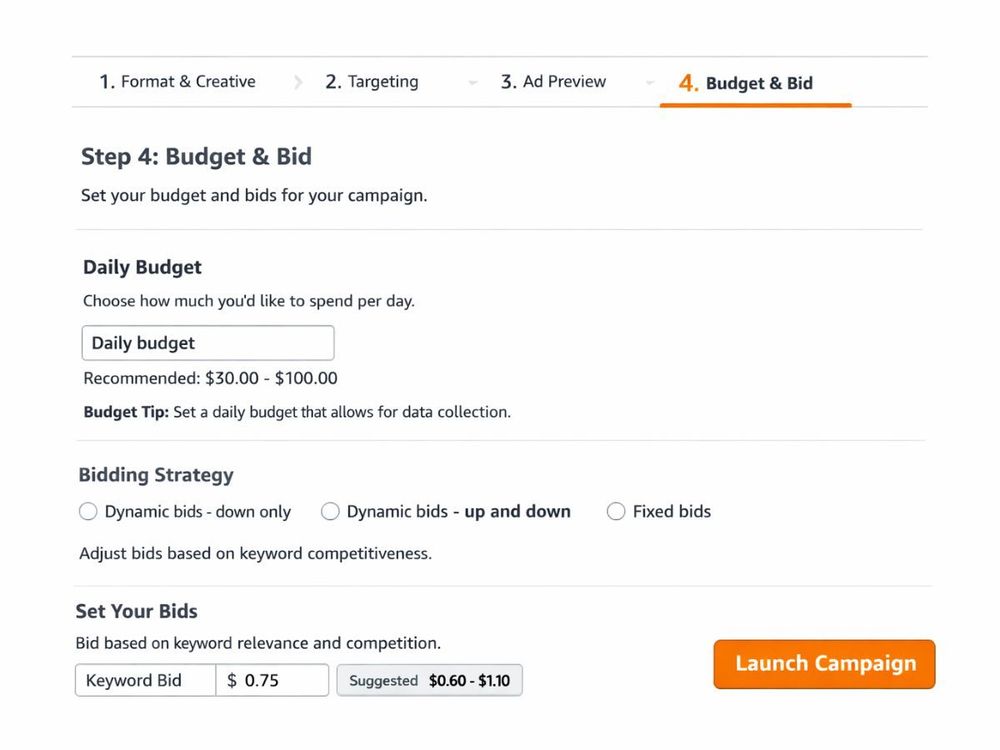
Step 4: Budget & Bid
Set a daily budget that allows data collection without overspending during the testing phase. Bids should reflect keyword competitiveness rather than compensating for creative underperformance in Amazon video Ads.
Step 5: Launch & Monitor
Submit the campaign for moderation review and wait for approval before making adjustments. Early performance indicators such as CTR and conversion trends help determine whether optimization should focus on targeting or creative refinement.
What Targeting Options Drive Performance for Amazon Video Ads?
Search-intent targeting drives the strongest results. Most high-performing Amazon video Ads campaigns succeed because they align video creative with active shopper demand rather than passive audience exposure.
Targeting should reflect the stage of the buying journey you want to influence.
1. Keyword Targeting: This approach works best when capturing shoppers who are actively searching for specific products or features. Campaigns using Amazon Sponsored Products video typically see stronger performance when aligned with high-converting exact or phrase-match keywords.
2. Product / ASIN Targeting: ASIN targeting performs well when your product has a clear competitive advantage that can be demonstrated visually. Placing video on competitor detail pages allows brands to influence shoppers during active comparison.
3. In-Market Audiences: Audience targeting is effective when expanding reach beyond direct keyword searches. It works best for brands using Amazon Sponsored Brands video ads to support category-level visibility rather than single-ASIN performance.
4. Retargeting: Retargeting delivers results when re-engaging shoppers who viewed a product but did not purchase. This approach reinforces product value and often improves efficiency when layered on top of search-based campaigns.
How Should You Measure and Optimize Amazon Video Ads?
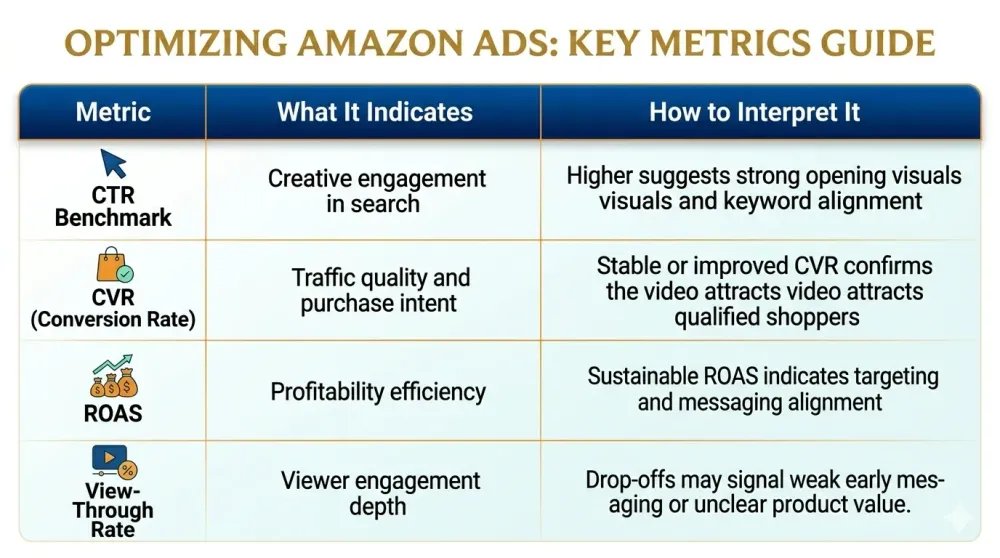
CTR is the primary leading indicator. For Amazon video Ads, click-through rate reveals whether the creative is capturing attention inside search before conversion metrics even matter.
Once CTR establishes engagement strength, a deeper performance evaluation should follow.
Core Performance Metrics
Optimization Framework for Amazon Video Ads
Optimization should begin with CTR analysis before adjusting bids or budgets. Amazon video Ads perform best when creative, targeting, and placement decisions are refined through structured testing.
Creative Testing: If CTR is low, improve the first three seconds of the video to strengthen initial engagement.
Bid Control: Increase bids only when engagement is strong and visibility needs expansion.
Placement Review: Compare search and product page performance to identify where efficiency is strongest.
What Common Mistakes Do Brands Make With Amazon Video Ads?
The most common mistake is treating video as branding content instead of performance media. Amazon video Ads operate inside high-intent environments, so creative and targeting must reflect buying behavior.
Overproduced Storytelling: Long cinematic intros reduce engagement because search placements require immediate product clarity.
Ignoring Keyword Alignment: A video that does not match the targeted search term often drives clicks without conversions.
Relying on Sound: Search-based formats autoplay silently, so messaging must be visually clear without voiceover.
Skipping Compliance Checks: Failure to follow Amazon video ad specs leads to rejection delays and lost launch momentum.
Testing Without Structure: Changing bids and creative simultaneously makes it difficult to identify what actually impacts performance.
How Do Amazon Video Ads Compare to YouTube Ads in 2026?
Amazon video Ads capture demand; YouTube creates demand. The core difference lies in shopper intent and how close the user is to making a purchase.
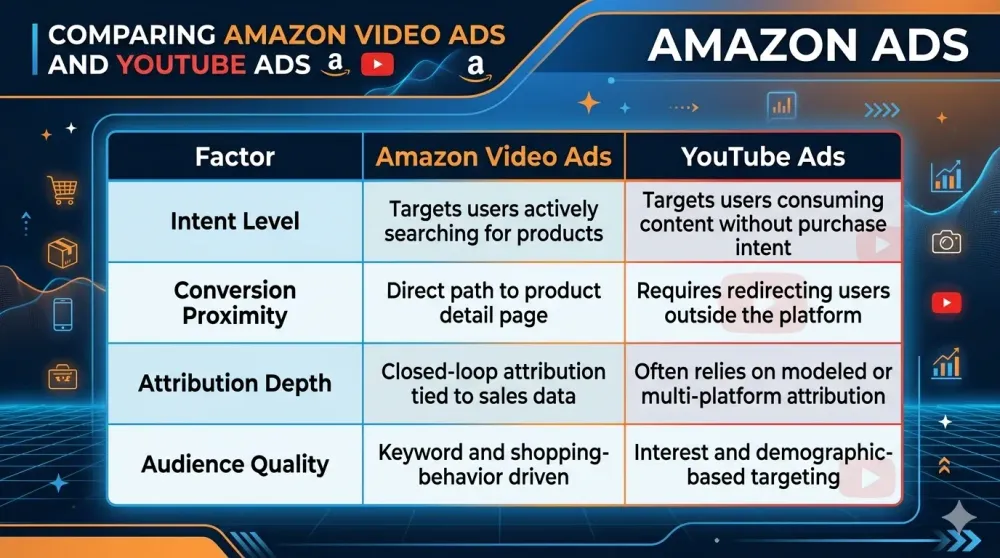
For performance-focused brands, the difference is practical. YouTube builds awareness at scale, while Amazon video Ads operate closer to the transaction.
How Does Xneeti Scale Amazon Video Ads Beyond Single Campaigns?
Video needs to be connected with ongoing creative testing and bid automation. Running isolated Amazon video Ads campaigns may lift CTR, but long-term scale depends on coordination across media, data, and optimization systems.
1. Creative + Media in One System
Xneeti OneOS links creative performance data directly with live bidding inside Amazon Ads. Instead of separating production and campaign management, both operate within a unified performance structure.
2. AI-Based Creative Testing
The platform reviews engagement and conversion signals to surface the strongest-performing variations. Testing decisions are guided by measurable patterns rather than manual guesswork.
3. Scaling Across ASINs
Success on a single ASIN does not automatically extend across a full catalog. Xneeti supports the structured rollout of Amazon Sponsored Products video campaigns across multiple SKUs while preserving targeting control.
4. Video as a Performance Channel
Video is treated as a measurable growth driver, not just a branding layer. With automation and disciplined testing, Amazon video Ads can scale revenue instead of remaining one-off experiments.
Final Thoughts
Video is emerging as the next layer within Amazon PPC. As static ads blend into crowded search grids, Amazon video Ads offer a way to improve visibility, engagement, and conversion without relying only on higher bids.
For brands moving beyond small-scale tests, execution discipline becomes critical. To combine creative testing, targeting accuracy, and automation in one system, book a demo with Xneeti OneOS and see how video can function as a scalable performance channel.


