


The listing was live. Shoppers could still find it in search. But the Add to Cart and Buy Now buttons were gone, because Amazon had stopped showing a Featured Offer on the product page.
Here’s how we traced the problem to a set of price settings that contradicted each other, fixed them at the source, and what you can check if your own Featured Offer goes missing.
| Case snapshot | |
| Issue | Featured Offer not showing on the product detail page |
| Root cause | Conflicting standard, minimum/maximum and Business Price settings |
| Fix | Corrected min/max values and aligned Business Price thresholds with the standard price |
| Result | Active offer status restored and Featured Offer visible again |
What was the problem?
The client told us the Featured Offer was no longer appearing on one of their product detail pages. The Featured Offer (often still called the Buy Box) is the offer Amazon places next to the Add to Cart and Buy Now buttons, and it’s where most purchases happen.
From the seller’s side, the signs were confusing:
The listing was still live and could be found in search.
The product page had no one-click buy buttons, only a “See All Buying Options” link.
There was no obvious error explaining why.
Any visit to the page, paid or organic, landed somewhere that couldn’t convert well.
Why do pricing conflicts hide the Featured Offer?
Amazon uses a seller’s own minimum and maximum prices as guardrails against pricing errors. If a live price falls outside that range, Amazon can treat it as a possible mistake and suppress the offer. A suppressed offer can’t win the Featured Offer.
That check covers the Business Price too, not just the standard price. In this case, Seller Central showed conflicts across three fields:
Standard price: the price regular shoppers see.
Minimum/maximum price: the guardrails, which no longer matched the live prices.
Business Price: the price for Amazon Business buyers, whose thresholds were out of step with the standard price.
How did Xneeti fix it?
We treated it as a pricing audit, not a guessing game. Instead of lowering the price and hoping, we went straight to the settings behind the offer:
Audited the full pricing setup. We reviewed the ASIN’s standard price, min/max limits and Business Price side by side, so every value could be checked against the others.
Corrected the conflicting min/max values. We reset the limits so every live price sat inside them.
Aligned the Business Price thresholds. We brought them back in line with the current standard selling price.
Confirmed the fix on the live page. We checked the offer status in Seller Central and made sure the Featured Offer was showing on the product page.
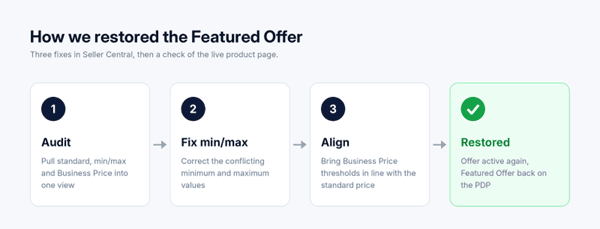
Once all three price fields agreed, the conflict was gone and the offer returned to active status.
What were the results?
The pricing conflict was fully resolved.
The ASIN regained active offer status.
The Featured Offer was visible again on the product detail page.
Shoppers could once more buy with Add to Cart or Buy Now.
With all price fields in agreement, a routine price change is far less likely to knock the offer offline again.
Is your Featured Offer missing? Quick checklist
Check that your standard price sits inside your own minimum and maximum limits.
Check your Business Price, and any quantity-discount tiers, against those same limits.
Make sure your Business Price still makes sense next to your current standard price.
Look for recent changes from a repricer, bulk upload or promotion that updated one field but not the others.
If pricing checks out, review the other Featured Offer eligibility factors, such as stock availability, fulfillment and customer service.
Conclusion
A missing Featured Offer doesn’t always mean you’ve been outpriced. Sometimes your own settings are working against you. Fixing it takes a careful look at every price field and the discipline to make them agree.
If your Featured Offer keeps disappearing or your listings are live but not converting, book a free catalog audit with Xneeti. Our Amazon catalog management team will find what’s holding your offers back and fix it at the source.


